Trace Anthropic JS/TS with Langfuse


Anthropic provides advanced language models like Claude, known for their safety, helpfulness, and strong reasoning capabilities. By combining Anthropic's JS/TS SDK with Langfuse, you can trace, monitor, and analyze your AI workloads in development and production.
This notebook demonstrates how to use the AnthropicInstrumentation library from OpenInference to automatically instrument Anthropic SDK calls and send OpenTelemetry spans to Langfuse.
What is Anthropic?
Anthropic is an AI safety company that develops Claude, a family of large language models designed to be helpful, harmless, and honest. Claude models excel at complex reasoning, analysis, and creative tasks.
What is Langfuse?
Langfuse is an open source platform for LLM observability and monitoring. It helps you trace and monitor your AI applications by capturing metadata, prompt details, token usage, latency, and more.
Step 1: Install Dependencies
Install the necessary packages:
npm install @anthropic-ai/sdk @arizeai/openinference-instrumentation-anthropic @langfuse/otel @opentelemetry/sdk-nodeNote: This cookbook uses Deno.js for execution, which requires different syntax for importing packages and setting environment variables. For Node.js applications, the setup process is similar but uses standard
npmpackages andprocess.env.
Step 2: Configure Environment
Set up your Langfuse and Anthropic API keys. You can get Langfuse keys by signing up for a free Langfuse Cloud account or by self-hosting Langfuse. Get your Anthropic API key from the Anthropic Console.
// Set environment variables using Deno-specific syntax
Deno.env.set("ANTHROPIC_API_KEY", "sk-ant-...");

// Langfuse authentication keys
Deno.env.set("LANGFUSE_PUBLIC_KEY", "pk-lf-...");
Deno.env.set("LANGFUSE_SECRET_KEY", "sk-lf-...");

// Langfuse host configuration
Deno.env.set("LANGFUSE_BASE_URL", "https://cloud.langfuse.com"); // 🇪🇺 EU region
// Deno.env.set("LANGFUSE_BASE_URL", "https://us.cloud.langfuse.com"); // 🇺🇸 US region
Step 3: Initialize OpenTelemetry with Langfuse
Set up the OpenTelemetry SDK with the LangfuseSpanProcessor and the AnthropicInstrumentation from OpenInference. The instrumentation automatically captures Anthropic SDK calls and sends them as OpenTelemetry spans to Langfuse.
import { NodeSDK } from "npm:@opentelemetry/sdk-node";
import { LangfuseSpanProcessor } from "npm:@langfuse/otel";
import { AnthropicInstrumentation } from "npm:@arizeai/openinference-instrumentation-anthropic";

import Anthropic from "npm:@anthropic-ai/sdk";

// Configure the instrumentation for the Anthropic SDK
const instrumentation = new AnthropicInstrumentation();
instrumentation.manuallyInstrument(Anthropic);

// Initialize the OpenTelemetry SDK with Langfuse as the span processor
const sdk = new NodeSDK({
  spanProcessors: [new LangfuseSpanProcessor()],
  instrumentations: [instrumentation],
});

sdk.start();
Step 4: Use the Anthropic SDK
Now use the Anthropic SDK as you normally would. All calls are automatically traced and sent to Langfuse.
const anthropic = new Anthropic();

const message = await anthropic.messages.create({
  model: "claude-haiku-4-5",
  max_tokens: 1000,
  messages: [{ role: "user", content: "Hello, Claude!" }],
});

console.log(message.content);

await sdk.shutdown();
View Traces in Langfuse
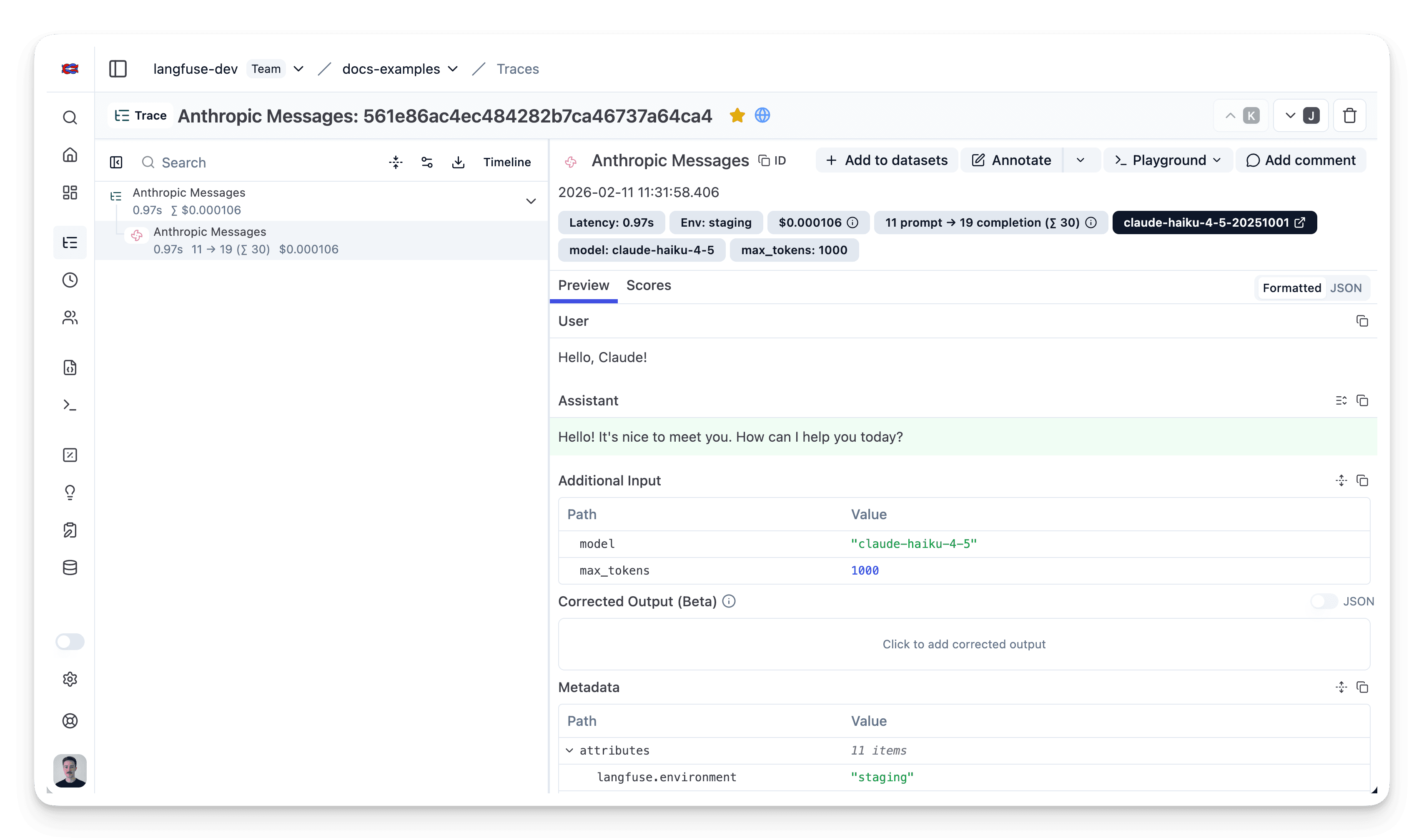
After running the application, navigate to your Langfuse Trace Table. You will find detailed traces of the application's execution, providing insights into the LLM calls, inputs, outputs, and performance metrics.
Interoperability with the JS/TS SDK
You can use this integration together with the Langfuse SDKs to add additional attributes or group observations into a single trace.
The Context Manager allows you to wrap your instrumented code using context managers (with with statements), which allows you to add additional attributes to the trace. Any observation created inside the callback will automatically be nested under the active observation, and the observation will be ended when the callback finishes.
import { startActiveObservation, propagateAttributes } from "npm:@langfuse/tracing";

await startActiveObservation("context-manager", async (span) => {
  span.update({
    input: { query: "What is the capital of France?" },
  });

  // Propagate userId to all child observations
  await propagateAttributes(
    {
      userId: "user-123",
      sessionId: "session-123",
      metadata: {
        source: "api",
        region: "us-east-1",
      },
      tags: ["api", "user"],
      version: "1.0.0",
    },
    async () => {

      // YOUR CODE HERE
      const { text } = await generateText({
        model: openai("gpt-5"),
        prompt: "What is the capital of France?",
        experimental_telemetry: { isEnabled: true },
      });
    }
  );
  span.update({ output: "Paris" });
});
Learn more about using the Context Manager in the Langfuse SDK instrumentation docs.
The observe wrapper is a powerful tool for tracing existing functions without modifying their internal logic. It acts as a decorator that automatically creates a span or generation around the function call. You can use the propagateAttributes function to add attributes to the observation from within the wrapped function.
import { observe, propagateAttributes } from "@langfuse/tracing";
import { generateText } from "ai";
import { openai } from "@ai-sdk/openai";

// An existing function
const processUserRequest = observe(
  async (userQuery: string) => {

    // Propagate attributes to all child observations
    return await propagateAttributes(
      {
        userId: "user-123",
        sessionId: "session-123",
        metadata: {
          source: "api",
          region: "us-east-1",
        },
        tags: ["api", "user"],
        version: "1.0.0",
      },
      async () => {

        // YOUR CODE HERE
        const { text } = await generateText({
          model: openai("gpt-5"),
          prompt: userQuery,
          experimental_telemetry: { isEnabled: true },
        });

        return text;
      }
    );
  },
  { name: "process-user-request" }
);

const result = await processUserRequest("some query");
Learn more about using the Decorator in the Langfuse SDK instrumentation docs.
Troubleshooting
No traces appearing
First, enable debug mode in the JS/TS SDK:
export LANGFUSE_LOG_LEVEL="DEBUG"Then run your application and check the debug logs:
- OTel spans appear in the logs: Your application is instrumented correctly but traces are not reaching Langfuse. To resolve this:
- Call
forceFlush()at the end of your application to ensure all traces are exported. This is especially important in short-lived environments like serverless functions. - Verify that you are using the correct API keys and base URL.
- Call
- No OTel spans in the logs: Your application is not instrumented correctly. Make sure the instrumentation runs before your application code.
Unwanted observations in Langfuse
The Langfuse SDK is based on OpenTelemetry. Other libraries in your application may emit OTel spans that are not relevant to you. These still count toward your billable units, so you should filter them out. See Unwanted spans in Langfuse for details.
Missing attributes
Some attributes may be stored in the metadata object of the observation rather than being mapped to the Langfuse data model. If a mapping or integration does not work as expected, please raise an issue on GitHub.
Next Steps
Once you have instrumented your code, you can manage, evaluate and debug your application:
